Built for the walk-in, the cabinet and the lockers. Not for a warehouse.
Generic point-of-sale counts units. A cigar shop counts boxes that get broken into singles, lines that rest for months before they are at their best, and humidors that drift. Ashbook keeps all of that straight, and tells you each morning what needs a hand.
Boxes and singles
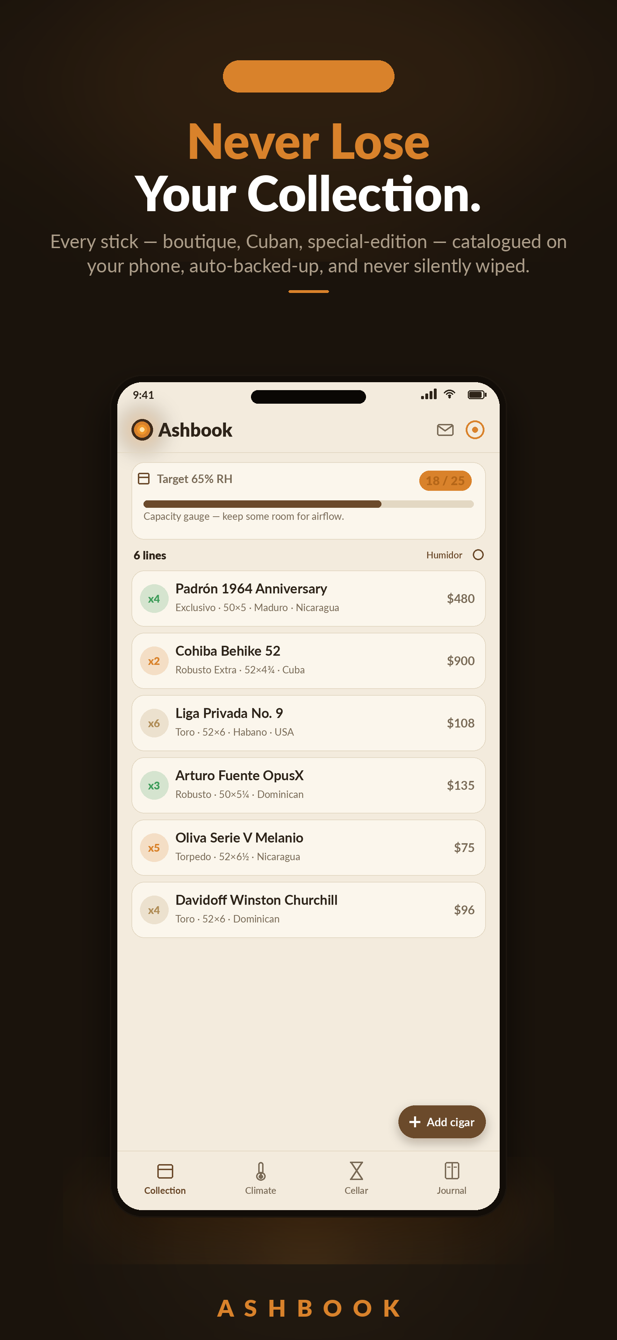
A line shows as “1 × 25 + 7”. Take one out and the count, the cost value and the capacity gauge all stay true.
Receive a delivery
Supplier, invoice, boxes into a humidor with cost per box. New lines rest from the delivery date; top-ups blend the cost.
Climate against each target
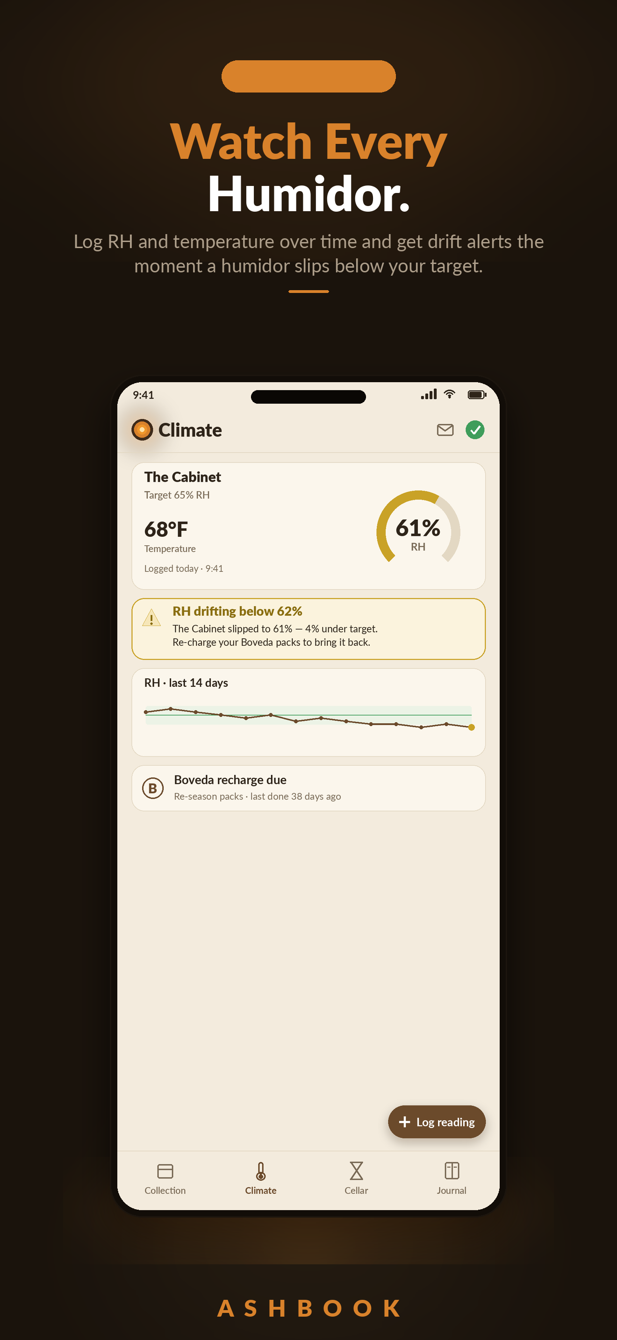
Log the hygrometer. Too dry, too wet, cold, hot, tobacco-beetle range at 72°F and up, and a nudge when a reading is stale.
Reads the sensor in the humidor
The phone app reads Bluetooth hygrometers from Govee, SwitchBot, SensorPush, Inkbird, ThermoPro and Ruuvi, plus Shelly BLU and any BTHome sensor, with no pairing. Here on the web, connect a Govee or SwitchBot account for Wi-Fi sensors, or post readings from a device you build. Each reading is logged about hourly and judged like one you typed.
Reorder points and sell-through
Flag a line at or under its reorder point, with how many went out this week, so the next order writes itself.
A dated manifest
Every line with cost and value, as a CSV, for insurance, the accountant or a stock-take.
A book per location
Sign in with Google and keep a book for each humidor, store or location. Rename, add or delete a book in a tap; two devices counting at once both count.
From an empty browser to a counted humidor in an afternoon
- Step 1
Open it as a guest, or sign in with Google
As a guest, everything stays on this device and nothing is sent anywhere. Sign in with Google and your books are kept in your account and in step on every device you use. Either way: no card, no email form.
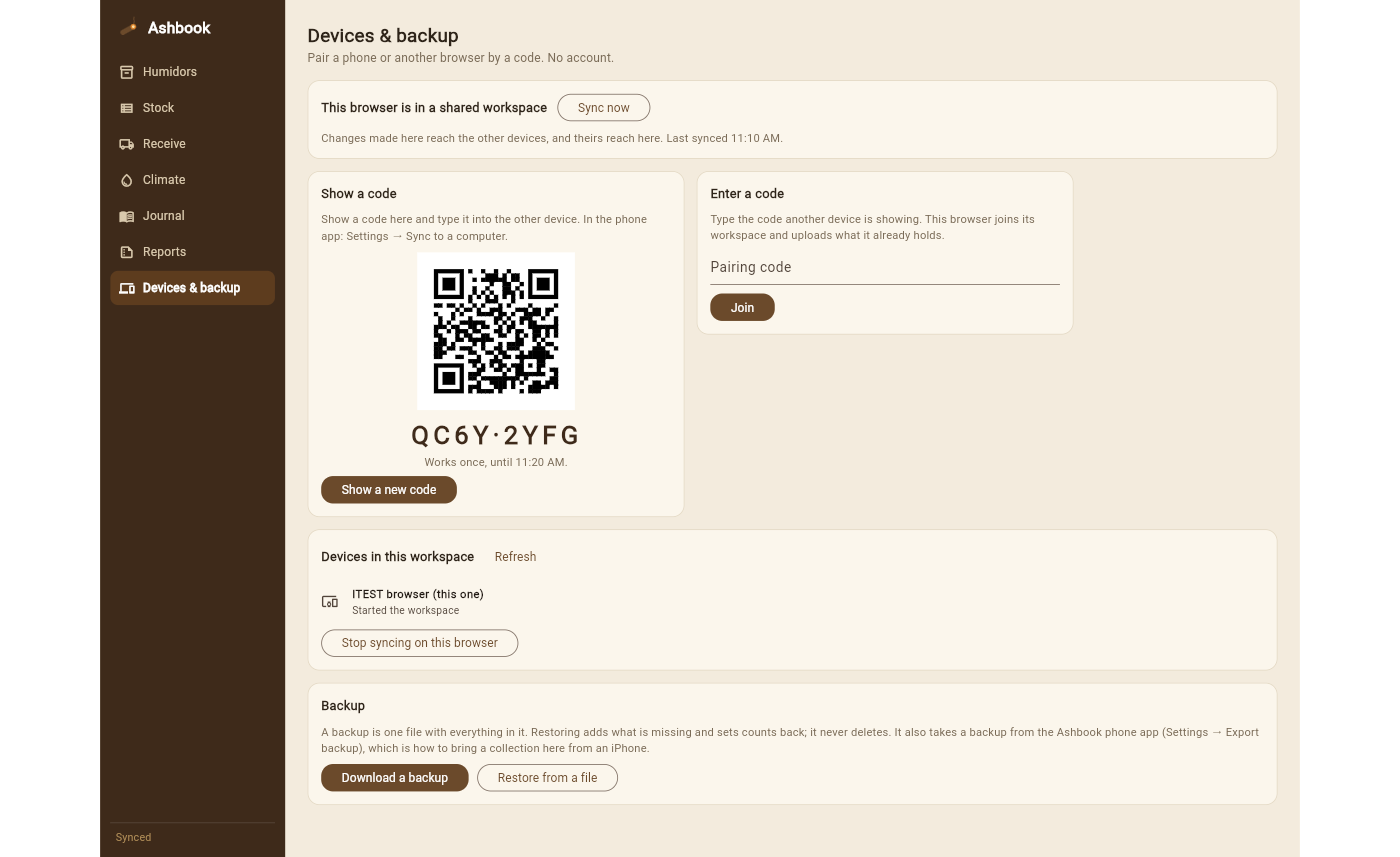
Devices & backup: pair by a code when you would rather not sign in. - Step 2
Add your humidors, then bring your stock in
Type lines in, receive a delivery box by box, or import what you already have: any spreadsheet (CSV, TSV, XLSX, JSON), the Ashbook phone backup, a StogieVault, Cigarro or Cigar Geeks export, or the item export from Shopify, Lightspeed, Square, Clover, QuickBooks or KORONA. Sizes, combined names, per-stick rows and box codes are read the way that app meant them. You see every row before anything is written, and nothing is ever deleted by an import.
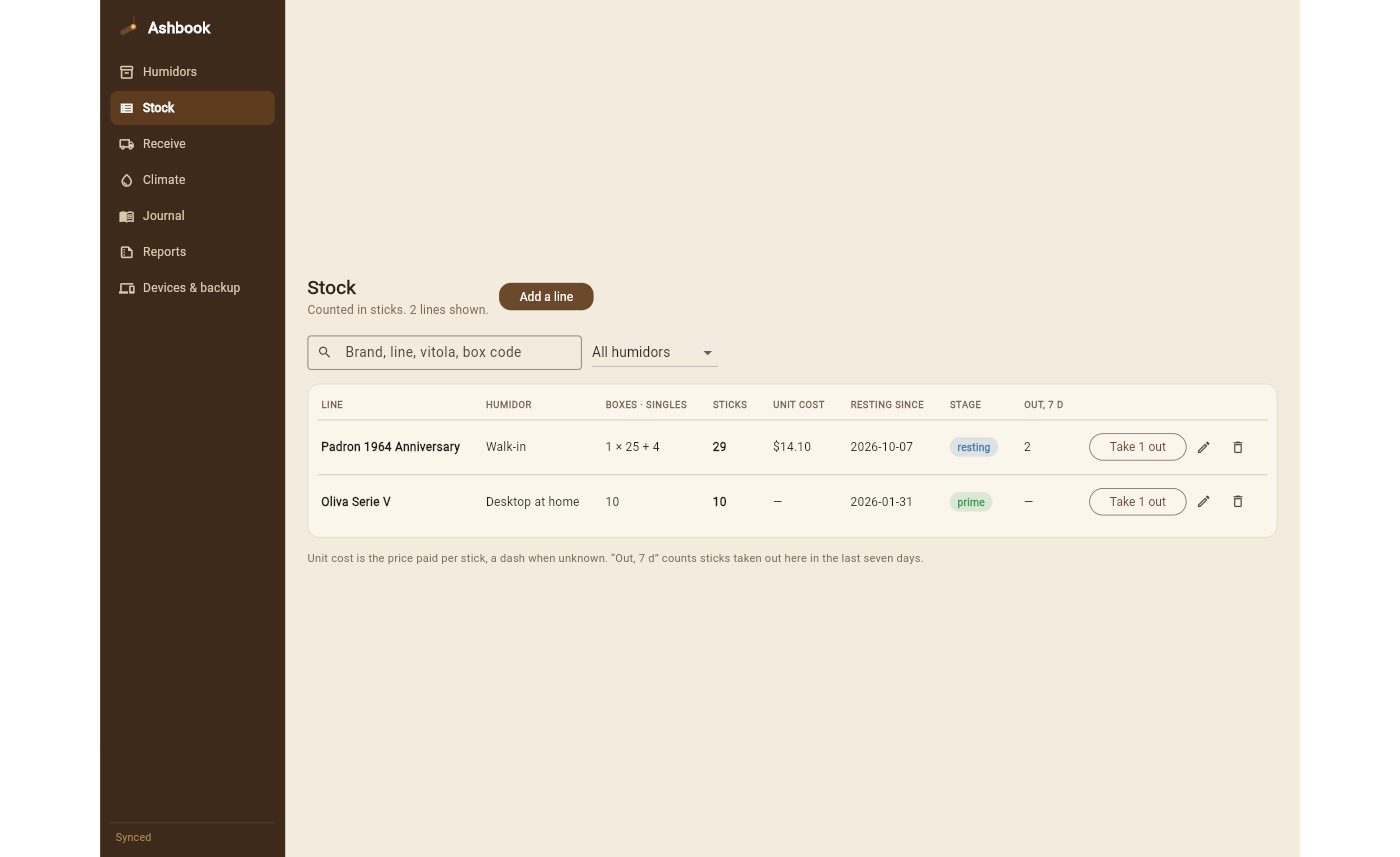
Stock, counted in sticks. Unknown cost is a dash, never a zero. - Step 3
Work the counter: take sticks out, log the hygrometer
Take 1 out is one click. A reading takes two numbers. The Today page turns the log into the morning list: what is low, what is past prime, which humidor is drifting.
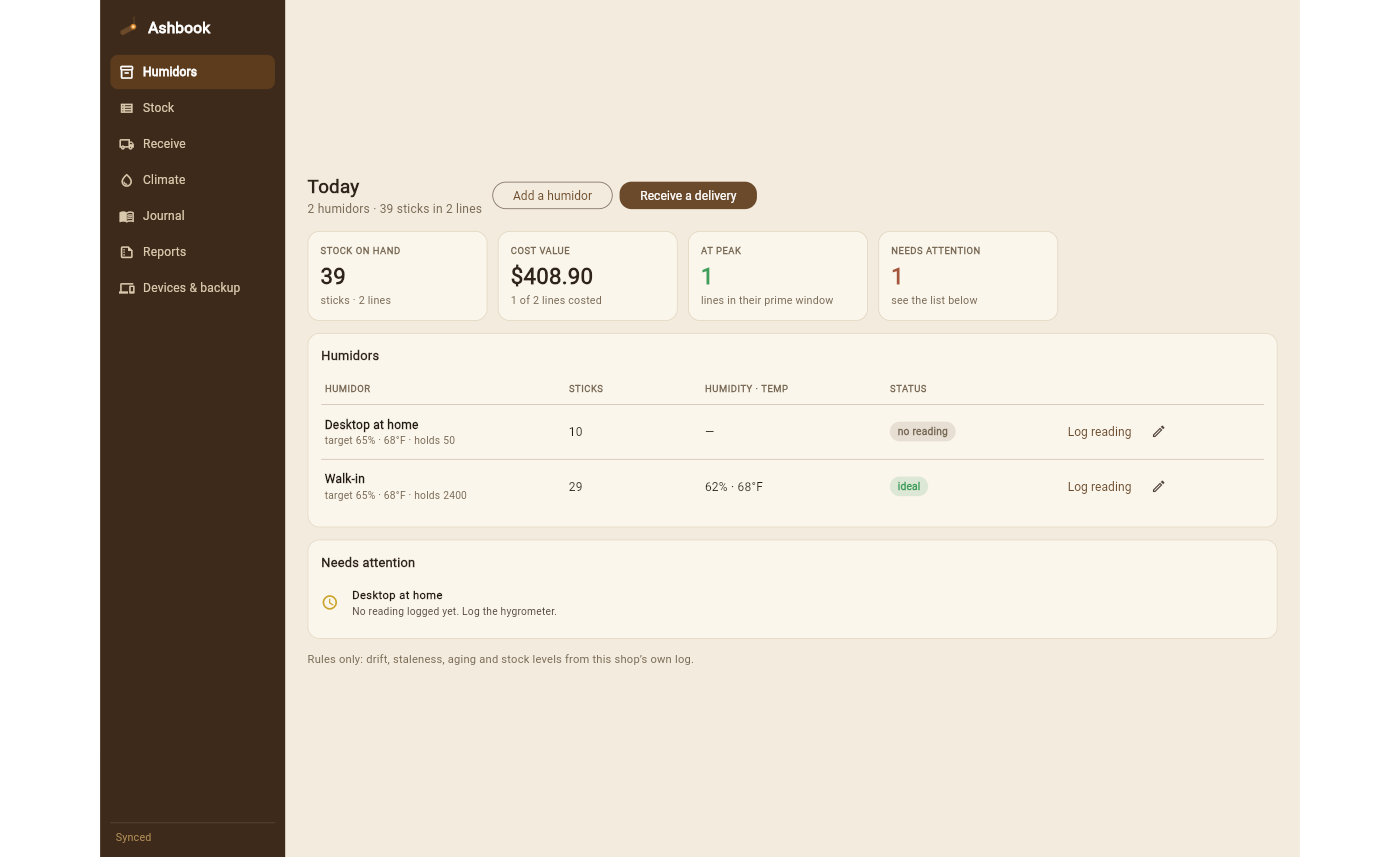
Rules only, from your own log. No outside prices, no AI guesses. - Step 4
Carry it on your phone, hand it to the accountant
The phone app keeps the same book, with reminders when a humidor needs checking. Reports give you cost value by humidor and the dated manifest as a file.
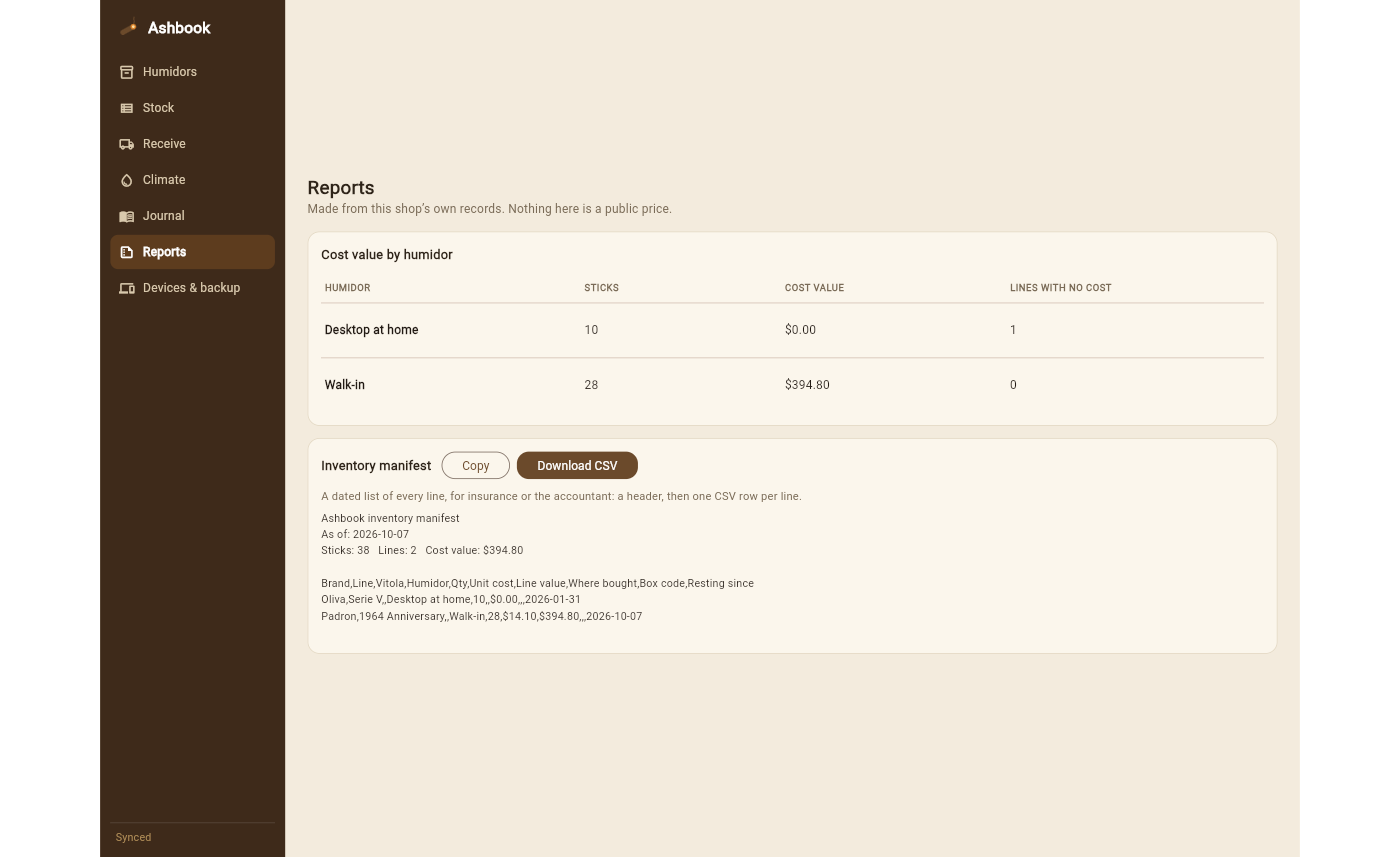
The same manifest the phone app has exported since day one.
Never lose your collection again.
The phone app is where Ashbook started: a local-first humidor tracker and tasting journal that cannot silently wipe your collection on an update, a new phone or a failed login. Automatic on-device backups, one-tap export and restore, free for everyone.
- Any cigar, hand-entered: boutique, Cuban, special edition, nothing rejected
- Aging timeline: resting, maturing, prime, past prime
- Humidity and temperature drift alerts, beetle warning
- Tasting journal with a palate profile
- Collection value and an insurance manifest
On an iPhone, Ashbook on the web is the up-to-date edition: open it in Safari and add it to your home screen. Export a backup in the app to bring your collection across.
Never leaves your device.
No account, no server, no network call with your stock in it. One book, saved where you are. Download a backup whenever you like.
Synced, and still yours.
Sign in with Google, or pair by a code, and the changes your devices make pass through our sync service over encrypted connections. Stop syncing on any device, delete a book, or erase the server's copy from inside the app. We never sell or look at your stock.
Inventory and storage. That is all.
Ashbook records cigars you already own and the conditions you keep them in. It does not sell tobacco, show market prices or tell you where to buy. For adults of legal age.
Free to start. Ashbook+ when you want all of it.
Free
On the web and on the phone: one humidor, 25 lines, deliveries, the journal, backup, pairing and sign-in. No card.
Open AshbookAshbook+
Unlimited humidors and lines, climate, reports and the manifest, the full journal. Monthly, yearly with a 7-day trial, or once for life. On the web it is paid through Stripe in the app; on the phone, through the store in your currency.
Prices in the appRunning a shop?
Ashbook+ covers a shop today. Staff logins, a till connection and an API are on the way. Tell us what your counter needs and we will build it in that order.
dev@adelyons.comQuestions shops and collectors ask
Is Ashbook a point-of-sale system?
No. It is the humidor inventory: what is on hand, what it cost, how it is aging and how it is stored. Keep your till; Ashbook takes sticks out by hand.
Does my stock list leave my computer?
As a guest, never. Signed in, your books are kept in your account so your other devices can see them, over encrypted connections, and you can delete a book from inside the app at any time. The privacy page says exactly what is stored.
I already track my stock somewhere else. Can I bring it over?
Yes. Ashbook reads any spreadsheet (CSV, TSV, XLSX or JSON) and recognises exports from StogieVault, Cigarro, Cigar Geeks, the Cigar & Cocktail and Cigar Dossier sheets, VictoryTek, Shopify, Lightspeed, Square, Clover, QuickBooks and KORONA as they are: sizes like 6 x 52, combined brand-line names, one row per stick, box codes and per-location counts are all understood. Anything else, map the columns once. You see every row before it is written, the phone app's backup file comes across too, tasting notes included, and nothing is deleted by an import.
What about my iPhone?
Open ashbook.adelyons.com/app in Safari and add it to your home screen. It works offline and syncs when you sign in. The App Store app still works; export a backup from it to bring your collection across.
Can two people work at once?
Yes. Two devices on the same book taking a stick out of the same line at the same moment both count. Nothing is overwritten by whoever saved last.
Which humidor sensors does Ashbook read?
The Android app reads Bluetooth hygrometers that broadcast their reading: Govee (H5075, H5074, H5101, H5102, H5179 and related models), SwitchBot Meter, Meter Plus, Outdoor Meter and Meter Pro, SensorPush HT.w, HTP.xw and HT1, Inkbird IBS-TH and ITH models, ThermoPro TP357, TP358, TP359 and TP393, RuuviTag, Shelly BLU H&T and any BTHome v2 sensor. No pairing and no account; adding a sensor and seeing its reading is free. It reads when you open Climate, and can also read with the app closed if you turn that on (Android decides when, so a reading can run late). On the web, Devices & backup connects a Govee or SwitchBot account for Wi-Fi sensors and gives a token to a device you build, such as an ESP32. Ashbook is not affiliated with these makers.
Who makes Ashbook?
Adelyons Software, an independent studio. The people who wrote it answer dev@adelyons.com.